
Reliable internet can make life aboard a boat more convenient. Whether you need to check the weather, stream entertainment, work remotely, update navigation software, or stay in contact with family, a strong onboard connection is valuable.
Unfortunately, boat Wi-Fi can be difficult to maintain. Marina networks may be weak, crowded, or blocked by other vessels. Metal structures, fiberglass layouts, distance from shore, and interference from other wireless devices can all reduce signal strength.
The best boat Wi-Fi extender can improve your connection by receiving a distant wireless signal and rebroadcasting it inside the vessel. But the right system depends on the type of internet connection you want to extend.
This guide explains how marine Wi-Fi extenders work, which features matter, and how to choose the right setup for your boat.
What Is a Boat Wi-Fi Extender?
A boat Wi-Fi extender, also called a marine Wi-Fi booster or wireless bridge, is a device designed to improve access to a Wi-Fi network that already exists nearby.
A typical system may include:
● An external antenna
● A wireless receiver
● An onboard router
● An internal Wi-Fi access point
● Ethernet connections
● Power and mounting hardware
● Management software or a mobile app
The outside antenna receives a Wi-Fi signal from a marina, dock, resort, or other network. The system then sends that connection to an onboard router, which creates a stronger private network inside the boat.
This is different from a cellular booster. A Wi-Fi extender improves access to an existing Wi-Fi network, while a cellular system uses a cellular signal and normally requires a separate data plan.
Having reliable equipment on board is just as important as having a strong internet connection. If you’re also preparing for battery-related emergencies, take a look at our guide, Best Boat Jump Starter: How to Choose the Right One.
How Does a Marine Wi-Fi Extender Work?
A marine Wi-Fi system generally works in three steps:
1. Receive: An external antenna captures a Wi-Fi signal from shore or another nearby access point.
2. Bridge or route: The system passes the connection to an onboard router.
3. Redistribute: The router provides Wi-Fi inside the boat for phones, laptops, tablets, smart TVs, and other devices.
Some systems simply repeat a Wi-Fi signal. Others connect to a distant network as a client and then create a separate private network onboard.
The second approach is often more useful on a boat because it can provide:
● Better coverage inside the cabin
● A private onboard network
● Easier connection for multiple devices
● More consistent network management
● Ethernet connectivity for selected equipment
Wi-Fi Extender vs. Cellular Booster
These devices are often confused, but they solve different problems.
| Feature | Boat Wi-Fi extender | Cellular booster |
| Uses | Existing Wi-Fi networks | Cellular networks |
| Common sources | Marina, dock, resort, shore hotspot | Mobile carrier signal |
| Service plan | Usually uses the existing Wi-Fi service | Requires a mobile data plan |
| Main limitation | Must be within range of Wi-Fi | Must have some usable cellular signal |
| Best for | Connecting to marina or shore Wi-Fi | Improving mobile internet offshore or in weak coverage |
| Equipment | Wi-Fi antenna, bridge, router | Cellular antenna, amplifier, modem or hotspot |
Some boat owners use both. A Wi-Fi extender can connect to marina internet while docked, and a cellular system can provide a backup when the boat leaves the marina.
What Is the Best Boat Wi-Fi Extender?
The best boat Wi-Fi extender should match your intended use, vessel size, and connection sources. Important features include:
● Outdoor or marine-suitable construction
● An external high-gain antenna
● Dual-band Wi-Fi support
● A reliable onboard router
● Ethernet ports
● Secure network management
● Support for multiple devices
● Strong weather protection
● Low power consumption
● Easy installation and configuration
● Compatibility with the available marina or shore network
There is no single best device for every boat. A small sailboat used near marinas may need a simpler system than a large cruiser used for extended coastal trips.
Types of Boat Wi-Fi Systems
Basic indoor Wi-Fi repeater
A basic repeater receives a Wi-Fi signal and rebroadcasts it from inside the boat.
Advantages
● Low purchase cost
● Simple setup
● Easy to move or replace
● Suitable for short-range use
Limitations
● May not receive distant signals well
● Can reduce available bandwidth
● Usually performs poorly through metal or dense cabin structures
● Indoor placement limits antenna height
● May not be designed for marine conditions
A basic household repeater may work when the boat is close to a strong marina access point, but it is often not the best solution for longer distances.
External Wi-Fi bridge
An external bridge uses an antenna mounted outside the boat to receive a distant wireless network. It then sends the connection to an onboard router, typically through Ethernet.
Advantages
● Better range than an indoor repeater
● External antenna has a clearer line of sight
● Can create a private onboard network
● Often supports multiple devices
● Suitable for marina and shore-based Wi-Fi
Limitations
● More involved installation
● Requires external mounting
● Needs weatherproof cable connections
● May require separate router equipment
This type of system is often the most practical choice for boat owners who regularly use marina Wi-Fi.
Integrated marine Wi-Fi router
An integrated marine router may combine external Wi-Fi reception, cellular connectivity, GPS, Ethernet, and onboard Wi-Fi in one system.
Advantages
● Centralized network management
● Can combine multiple internet sources
● Supports automatic failover
● Suitable for larger boats
● May offer remote monitoring
Limitations
● Higher purchase price
● More complicated setup
● May require additional antennas or service plans
● Requires careful installation and configuration
An integrated system can be useful for liveaboards, commercial vessels, workboats, and cruisers with several internet sources.
Key Features to Consider
External antenna
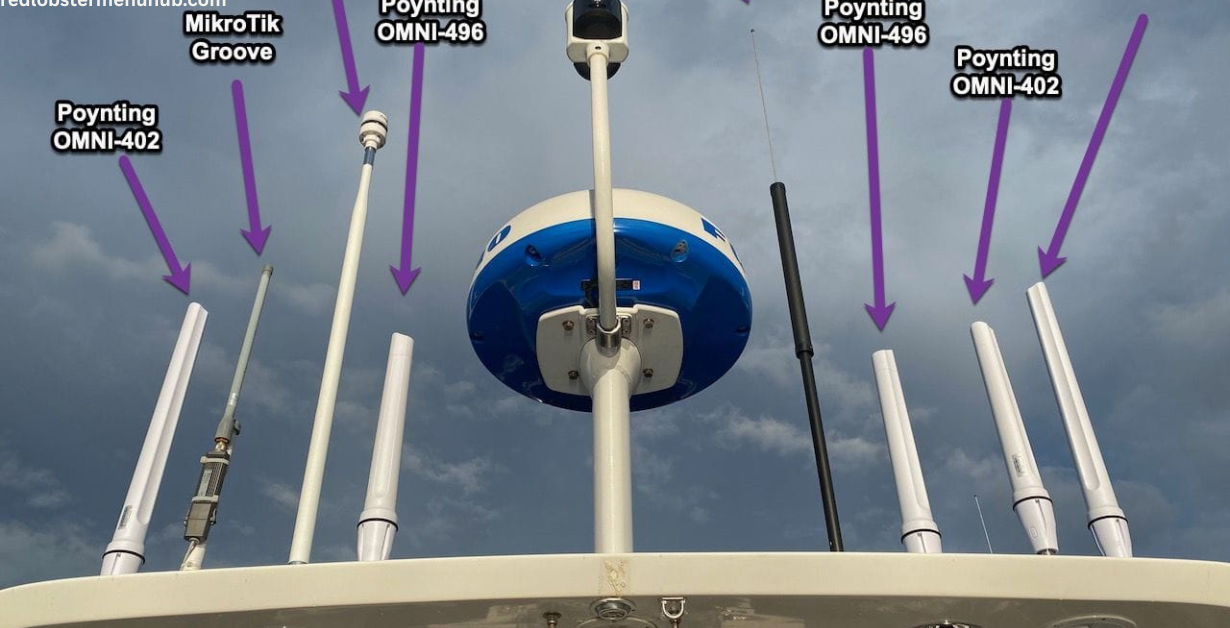
The antenna is one of the most important parts of a boat Wi-Fi system. An external antenna mounted above obstructions can often receive a cleaner signal than a router hidden inside the cabin.
Look for:
● Suitable frequency support
● Appropriate gain
● Weather-resistant construction
● A secure mounting method
● Quality coaxial or Ethernet connections
● Compatibility with the router or bridge
A high-gain antenna can improve range, but higher gain does not automatically guarantee better performance. Antenna height, orientation, installation quality, and line of sight also matter.
A dependable power supply is essential when you’re using Wi-Fi and other electronics on your boat. To learn how to keep your marine battery properly charged and ready for use, check out Best Boat Battery Charger: How to Choose the Right One for Your Boat.
Dual-band Wi-Fi
A dual-band system supports both 2.4 GHz and 5 GHz Wi-Fi.
2.4 GHz
The 2.4 GHz band generally:
● Travels farther
● Passes through some obstructions more effectively
● Supports many older devices
● May experience more interference
5 GHz
The 5 GHz band generally:
● Offers higher potential speeds
● Has more available channels in many environments
● Works well over shorter distances
● Is more easily weakened by walls and obstructions
A dual-band system gives you more flexibility when connecting devices aboard the boat.
Wi-Fi standard
Newer Wi-Fi standards can improve speed, efficiency, and performance with multiple connected devices. However, the actual benefit depends on the internet source, antenna, router, and connected equipment.
A modern Wi-Fi standard may be worthwhile if you:
● Stream video
● Use multiple devices simultaneously
● Work remotely
● Transfer large files
● Operate smart marine electronics
● Need efficient performance in a crowded marina
Do not pay for a high-speed onboard router if the marina connection is slow or unreliable. The weakest part of the network still limits overall performance.
Ethernet ports
Ethernet ports provide a wired connection for devices that need stability or low latency.
They can be useful for:
● Navigation equipment
● Network switches
● Smart TVs
● Computers
● Network storage
● Security systems
● Additional wireless access points
A wired connection can also reduce congestion on the onboard Wi-Fi network.
Power requirements
Boat electronics run on limited electrical resources, especially when anchored or operating away from shore power.
Compare:
● Operating voltage
● Average power consumption
● Startup current
● Standby consumption
● Compatibility with your boat’s electrical system
● Required fuse or circuit protection
A low-power system may be more appropriate for a smaller boat or an installation that runs continuously from batteries.
Weather resistance
An antenna mounted outside is exposed to:
● Rain
● Salt spray
● Sunlight
● Wind
● Temperature changes
● Condensation
● Vibration
Use equipment designed for outdoor or marine installation. Indoor networking hardware should not be mounted in an exposed location unless the manufacturer specifically permits it.
Weather resistance applies to more than the antenna. Cable glands, connectors, power supplies, and mounting hardware also need protection from moisture and corrosion.
Moisture can be a concern inside an enclosed boat cabin, especially when electronic equipment is being used regularly. For practical tips on managing humidity and choosing the right equipment, see our guide, Best Boat Dehumidifier: How to Choose the Right One for Your Boat.
Network security
A boat Wi-Fi system should allow you to secure the onboard network with a strong password and current encryption standards.
Useful security features may include:
● WPA2 or WPA3 support
● Firewall functions
● Guest network access
● Automatic firmware updates
● Device management
● Separate networks for guests and onboard equipment
● Ability to disable unused services
Avoid leaving the router with its default password. A boat network may connect to computers, cameras, navigation equipment, and smart devices, so security should not be overlooked.
Multiple network sources
Some marine routers can use more than one internet source, such as:
● Marina Wi-Fi
● Cellular data
● Satellite internet
● Tethered smartphone
● Ethernet-connected shore internet
A system with multiple WAN inputs can switch between sources when one becomes unavailable. This feature is called failover.
More advanced systems may combine multiple sources, but configuration can be complicated and performance depends on the service providers.
How Much Range Do You Need?
The required range depends on the distance between the boat and the Wi-Fi access point.
A system used at a dock may need to connect across only a short distance. A boat anchored farther from shore may need better antenna height, directional capability, and clearer line of sight.
Range is affected by:
● Distance from the access point
● Antenna height
● Antenna gain
● Obstructions
● Boat orientation
● Marina construction
● Other wireless networks
● Weather and interference
● Transmit power
● Network congestion
Manufacturers may advertise maximum range under ideal conditions. Real-world range can be significantly shorter, especially around boats, docks, buildings, trees, and metal structures.
Omnidirectional vs. Directional Antennas
Omnidirectional antennas
An omnidirectional antenna sends and receives signals around the antenna’s horizontal plane.
Advantages
● Does not need constant aiming
● Useful when moving or swinging at anchor
● Convenient in marinas
● Suitable when access points are located in multiple directions
Limitations
● May have less focused range
● Can receive more interference
● May not perform as well over long distances
Directional antennas
A directional antenna focuses more of its reception and transmission in a particular direction.
Advantages
● Can improve connection to a known access point
● May perform better over longer distances
● Can reduce some interference from other directions
Limitations
● Must be aimed correctly
● Less convenient when the boat changes position
● May require manual adjustment
● Not ideal when access points are spread around the boat
For most recreational boats in marinas, an omnidirectional setup is easier to use. A directional system may be worthwhile for a fixed anchorage or long-range connection to a known shore network.
Why Boat Wi-Fi Can Be Unreliable
Even a high-quality extender cannot create internet where no usable signal exists.
Common causes of poor boat Wi-Fi include:
Weak marina network
The access point may be too far away or unable to handle the number of connected users.
Network congestion
A crowded marina can have many boats, phones, streaming devices, and computers sharing the same wireless system.
Physical obstructions
Buildings, dock structures, trees, hills, and other boats can block or weaken the signal.
Metal and equipment interference
Metal structures and nearby electronics may affect signal quality and coverage.
Poor antenna placement
An antenna mounted low or behind an obstruction may perform worse than one positioned higher with a clear view.
Weather and moisture damage
Water intrusion into connectors or cable ends can cause intermittent performance or permanent equipment failure.
Incorrect configuration
A system may be connected to the wrong network, using an unsuitable frequency band, or configured with an improper mode.
How to Install a Boat Wi-Fi Extender
Installation requirements vary by system, but the general process includes the following steps.
1. Choose the mounting location.
Mount the external antenna where it has:
● A clear view toward likely access points
● Adequate height
● Protection from unnecessary impact
● A secure mounting surface
● Safe distance from other antennas
● A practical cable route
Avoid placing antennas too close together if the system includes Wi-Fi, cellular, VHF, GPS, or satellite equipment.
2. Install the antenna securely
Use a marine-compatible mount and hardware. The antenna should not move excessively in wind or waves.
Check for:
● Proper alignment
● Secure fasteners
● Correct sealing
● Protection against galvanic corrosion
● Adequate clearance from rigging and moving equipment
3. Route the cable carefully
Avoid sharp bends, pinch points, excessive heat, and areas where the cable may be stepped on or exposed to chafe.
Seal deck penetrations with appropriate marine-grade materials. Water entering around a cable can damage the boat’s interior as well as the network equipment.
4. Mount the router or bridge
Place the interior equipment in a dry, ventilated location. Keep it accessible for configuration but protected from water, condensation, and excessive heat.
5. Connect power correctly
Use the recommended voltage, fuse, wire size, and polarity. Follow marine electrical installation practices and the equipment manufacturer’s instructions.
6. Configure the network
Set up:
● The external Wi-Fi connection
● The onboard network name
● A strong password
● Security settings
● Automatic updates
● Guest access
● Failover options, if available
7. Test the system
Test the connection from several locations inside the boat. Check performance near the bow, stern, cabins, cockpit, and helm.
Also test the system:
● With multiple devices connected
● At different distances from shore
● With doors and hatches closed
● After the boat changes orientation
● During normal engine and electronics operation
How to Improve Boat Wi-Fi Performance
Mount the antenna higher
A higher antenna may provide a better line of sight to the shore access point.
Keep cables short where appropriate
Long cable runs can result in signal loss, depending on the cable type and frequency. Some systems use Ethernet to place the radio close to the antenna and reduce cable loss.
Use quality connectors
Poorly installed or corroded connectors can cause intermittent connections and signal loss.
Choose a less crowded channel
If the system allows manual channel selection, a less congested channel may improve performance. Automatic channel selection may also help in changing environments.
Separate guest and equipment networks
A dedicated network for marine electronics can reduce congestion and improve security.
Limit unnecessary devices
Smart TVs, cameras, automatic updates, and streaming devices can consume bandwidth. Disconnect equipment that does not need constant access.
Update firmware
Firmware updates may improve stability, compatibility, and security. Apply updates according to the manufacturer’s instructions.
Boat Wi-Fi Extender vs. Mobile Hotspot
A mobile hotspot uses a cellular network rather than marina Wi-Fi.
A hotspot may be better when:
● You are away from marina Wi-Fi
● Cellular coverage is strong
● You need a simple portable solution
● Only a few devices need internet access
A boat Wi-Fi extender may be better when:
● Marina Wi-Fi is available
● Several devices need access
● You want a permanent installation
● You need an external antenna
● You want to share one connection throughout the boat
Cellular performance varies by carrier, location, weather, antenna placement, and network congestion. In many cases, using both a Wi-Fi extender and a cellular hotspot provides greater flexibility.
Boat Wi-Fi Extender vs. Satellite Internet
Satellite internet can provide connectivity far from shore, but it generally requires more expensive equipment, more power, and a service plan.
A Wi-Fi extender is usually more practical when:
● You remain near marinas
● You have access to shore-based Wi-Fi
● You need lower equipment costs
● You want a low-power solution
Satellite internet may be more appropriate when:
● You spend extended periods offshore
● You work remotely from the boat
● You need internet far beyond cellular coverage
● You can support the equipment’s power and installation requirements
A Wi-Fi extender cannot replace an offshore connection if no Wi-Fi network is within range.
Common Boat Wi-Fi Mistakes
Confusing Wi-Fi extension with internet generation
An extender can improve access to an existing network. It cannot create an internet connection if no usable source is available.
Using a household router in an exposed location
Indoor equipment can fail quickly when exposed to salt spray, rain, condensation, and vibration.
Mounting the antenna too low
Obstructions and nearby structures can weaken the signal.
Ignoring cable losses
Poor-quality or overly long coaxial cable can reduce the benefit of an external antenna.
Leaving the default password in place
Default credentials make it easier for unauthorized users to access the onboard network.
Running too many devices at once
Streaming video, cloud backups, software updates, and cameras can quickly consume limited bandwidth.
Failing to protect cable penetrations
An unsealed deck penetration can lead to water damage, mold, corrosion, and structural problems.
Expecting marina Wi-Fi to perform like home broadband
The marina’s internet service may be shared by many users and may have limited capacity.
Best Boat Wi-Fi Extender by Use Case
Best for a small boat
A compact dual-band router or simple Wi-Fi bridge may be sufficient for occasional marina use.
Best for a cruising boat
An external Wi-Fi bridge connected to an onboard router can provide better range, coverage, and network control.
Best for a liveaboard
A marine router that supports Wi-Fi, cellular, Ethernet, and automatic failover may be the most flexible choice.
Best for offshore use
A Wi-Fi extender alone is not sufficient offshore. Consider cellular equipment for coastal coverage or satellite internet for areas beyond terrestrial networks.
Best for a boat without shore power
Choose a low-power system and monitor its effect on the battery bank. Turn off the equipment when it is not needed.
Frequently Asked Questions
What is the best Wi-Fi extender for a boat?
The best system is one with an external antenna, marine-suitable installation, dual-band support, and a reliable onboard router to handle your specific boat size and connectivity needs.
📅 Last updated: